momputer
Mom: a cartoon granny with her hair in a bun and giant round glasses, smiling

momputer: A mom for you, your computer and your AIs.

She turns off what Claude Code, Codex and friends left running, frees up disk space, checks your drives, memory, sound and Windows settings, and tidies your folders. She always shows you first.

Download for Windows

Windows 10 and 11, 64-bit

  • Free for personal use
  • Sends nothing about you
  • Asks before she cleans
The momputer widget. Mom smiles from her round screen next to a dot-matrix 8, the words 8 leftovers, one tap and they're gone, and a Clean up 8 leftovers button. Below are the tabs Running, Upkeep, Rooms and House rules.

AI agents start dev servers, watchers and headless browsers, and nobody turns them off. Mom knows which agent started what, shows you what was left behind, and cleans it up.

What she does

A look around the widget.

Running

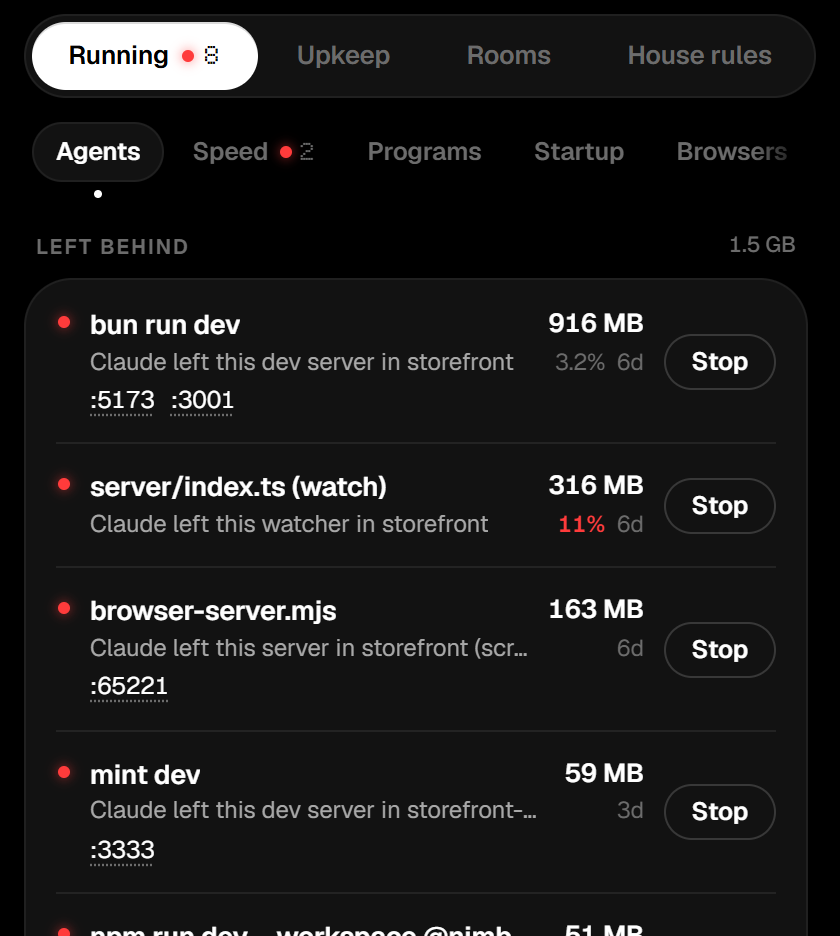
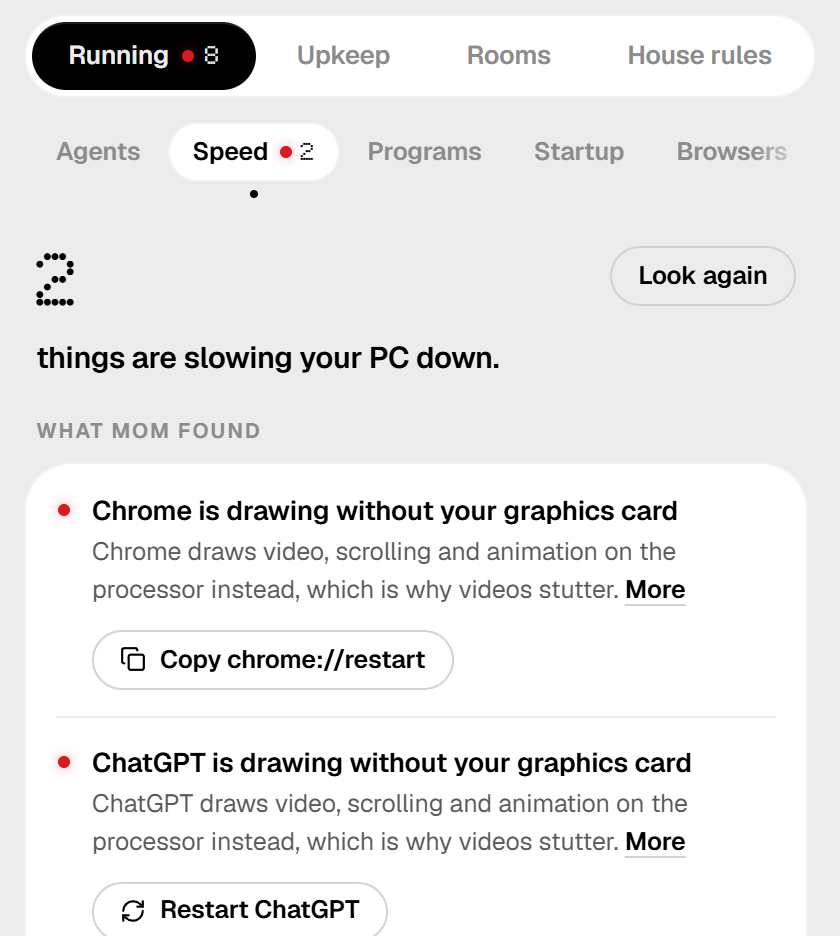
Everything your agents started, who started it, and one button to stop what was left behind. Speed says why the PC feels slow right now, with a fix for each reason.

More about Running
  • Programs, Startup and Browsers show what's open, what starts with Windows, and every browser extension, with a switch for each.
  • If leftovers start using a lot of CPU, she tells you. If you let her, she turns them off herself.
  • Agent health: every MCP server, hook and setting your agents have, and which servers answer or are waiting for a sign-in.
  • Homework: what each agent session changed, deleted, installed and pushed this week, beside what it told you.
  • Setup weight: how much every new chat starts with, and the heaviest part.
The Running tab. Under Left behind, four dev servers and watchers Claude left in a project called storefront, each with a red light, its memory, its age and a Stop button. The Speed tab: 2 things are slowing your PC down. Chrome is drawing without your graphics card, with a button that copies chrome://restart.

Upkeep

What can be deleted, and exactly what it is, before anything goes.

More about Upkeep
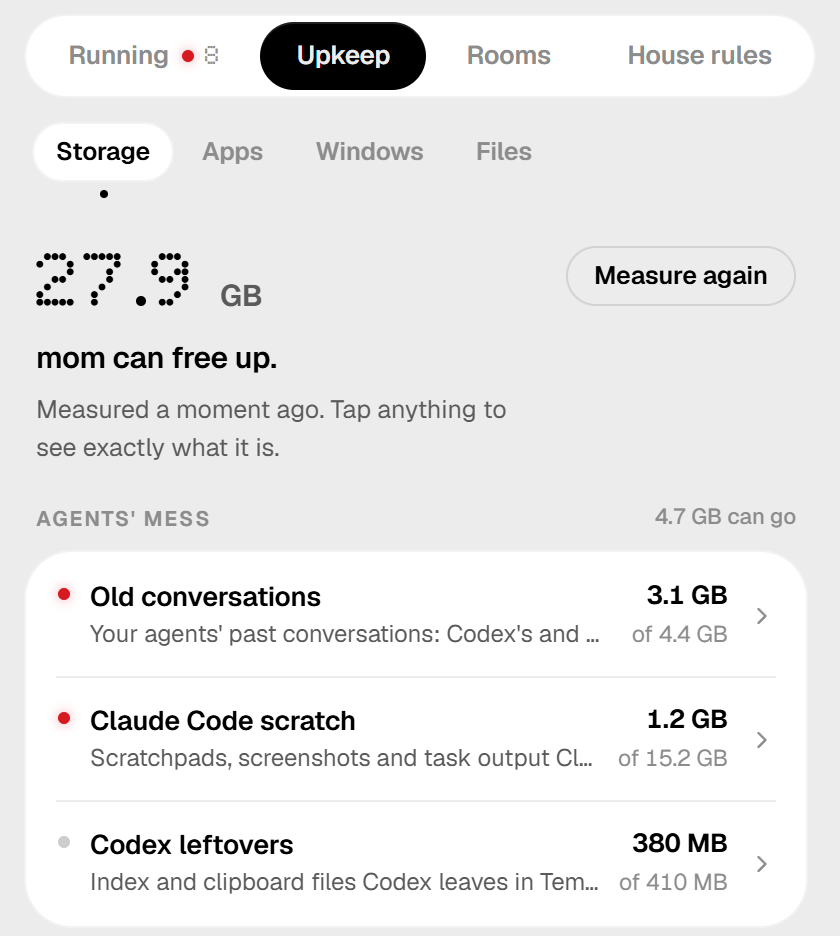
  • Storage: agents' scratch folders, old build folders, developer and browser caches, old installers.
  • Apps: the apps and Steam games you haven't opened in a year, with how big each one is and where it lives.
  • Files: copies of the same file, and big files nobody opened in a year.
  • Old conversations aren't deleted. Mom moves them to another drive and leaves a link, so your agents still open them.
  • Old driver versions, and downloads you're done with.
  • Autopilot, off until you switch it on: once a week she clears the safe things herself.
  • What I did: everything mom did, day by day, with Undo where it can be undone.
The Upkeep tab on Storage: 27.9 GB mom can free up, then a list with old conversations, Claude Code scratch and Codex leftovers, each with its size.

Checkup

Drives, memory, graphics, sound, updates and Windows settings: what's wrong, and the button that fixes it.

More about the checkup
  • An SSD's own health report: how much of its rated life is used, and how hot it runs.
  • Memory running below the speed it's made for.
  • Sound devices an uninstalled app left behind.
  • Screens below their refresh rate, devices with problems, slow starts, and what wakes the PC at night.
  • Stability: a month of crashes at a glance, and a week of watching after a memory or BIOS change.
  • Backups: folders nothing backs up, and work that exists only on this PC.
  • Keys left in your shell history or in files git keeps, with a button to blank them.
  • Fixes to your own settings are backed up and can be undone.
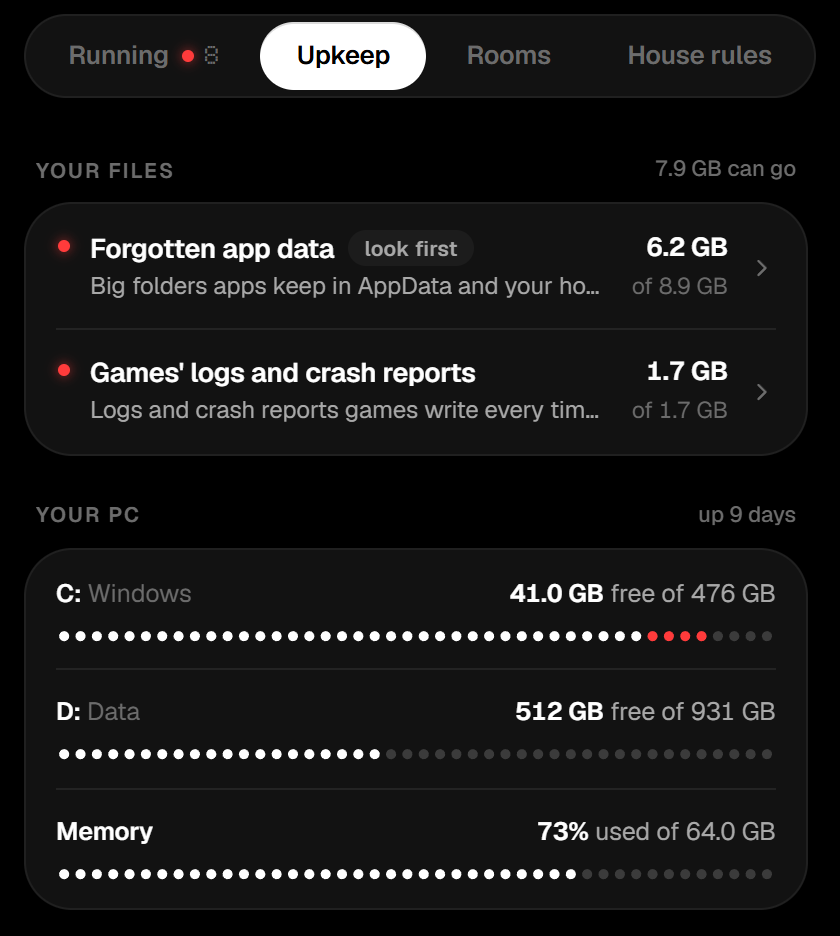
The checkup in Upkeep: dot meters for free space on drives C and D and for memory in use. The last dots of drive C are red because it's nearly full.

Rooms

Point her at a messy folder. She grades it and tidies it, with undo.

More about Rooms
  • She spots look-alike folders, screenshot piles, empty folders and misspelled names.
  • You get a plan to apply and undo with one click, or a chore list to paste to your agent.
  • She never moves your projects. She only tidies inside them.
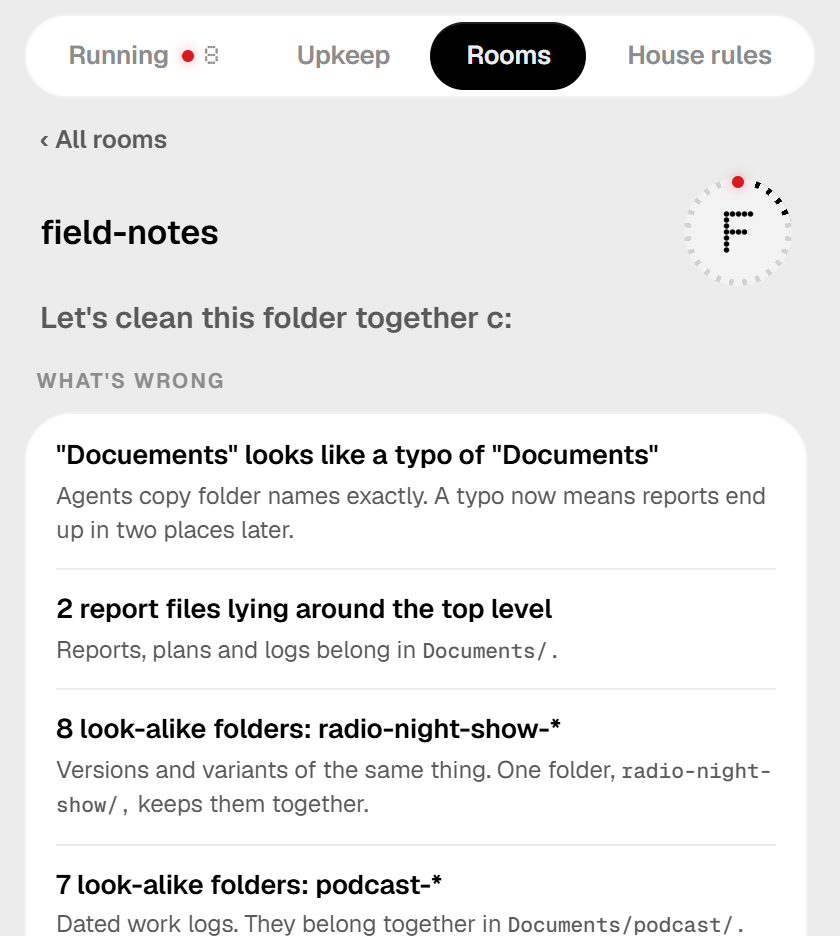
The Rooms tab on a folder called field-notes, graded F. Mom says let's clean this folder together, and lists what's wrong: a misspelled folder name, loose report files and look-alike folders.

House rules

One set of rules every agent is given, and checked against.

More about House rules
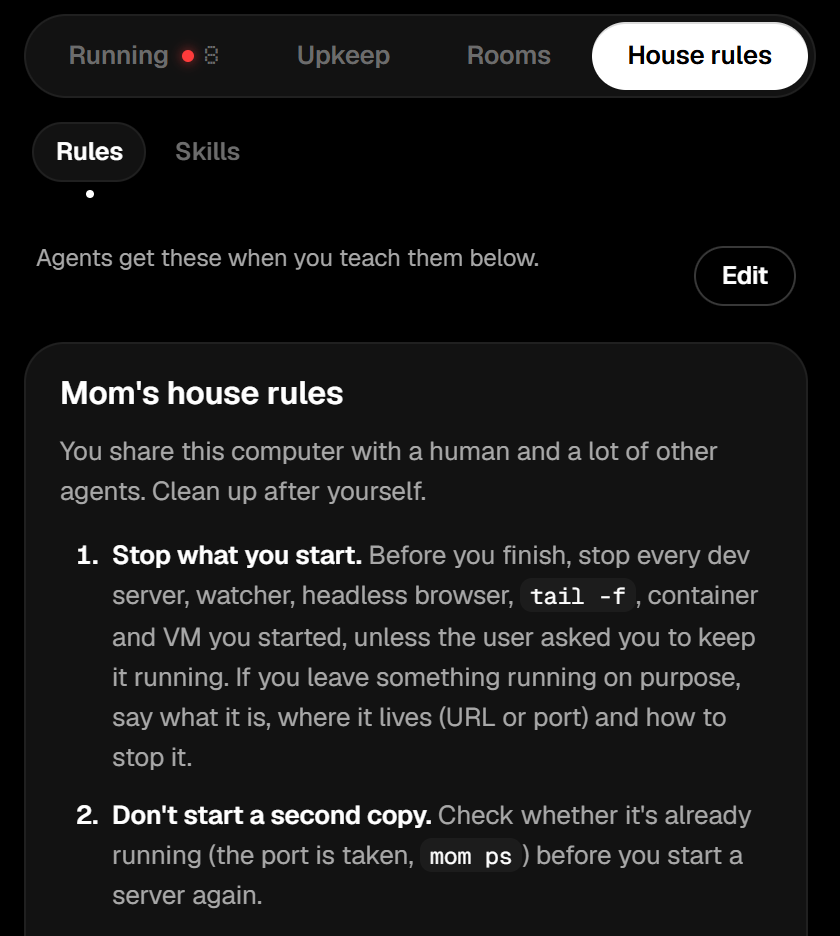
  • Stop what you start. Reports go in Documents/. One thing, one folder.
  • Mom writes them into Claude Code's, Codex's and Gemini's instructions, in a marked block she can take out again.
  • The Skills view lists the eleven skills, with what to say, and tells you when your agent's copy is behind.
The House rules tab with its two views, Rules and Skills. Mom's house rules begin: stop what you start, and don't start a second copy.

BIG MODE

One button turns the widget into a full window, with your PC on mom's desk, drawn with the parts it really has. Each part has a light, and the glass side swings open when you pick one inside. Tap one and mom tells you what's wrong and how to fix it. It's also where you read a skill, a hook or a settings file, with keys blanked.

BIG MODE: a full window with mom on a monitor on her desk, next to a PC tower with its glass side open and a small light on each part. A card tells you about the part you picked, and the widget's lists run down the right side.

For your agents

Agents can ask mom themselves, and she checks in on them.

The mom command

What the widget knows, in a terminal. The read-only commands take --json for scripts and agents.

mom leftovers
only what was left behind
mom stop mine
stop what your session started
mom trash
what can go, and what each clean-up does
mom pc
what the PC is, and its protection, updates and hardware
mom tidy <folder>
grade a folder and list what to fix
mom undo
undo the last tidy-up
mom homework
what each agent session did this week

Every command

Check-ins

Before an agent says it's done, mom checks in and asks it to stop what it started.

  • When a session starts She hands the agent the house rules.
  • When the agent thinks it's done She asks about servers still running and new clutter in the project. She mentions each thing once.
  • When the session ends She notes what it left behind.
  • When an agent is waiting for you She lets you know, if you switch it on.

They're hooks, for Claude Code and Codex. Switch them on under House rules, or run mom install claude-hooks codex-hooks.

Eleven skills

Each one tidies one room of your digital life. It looks first, shows one page of what it found, and acts only on what you tick. They work without momputer, in Claude Code or Codex.

In Claude Code, all of them in one line:

/plugin install momputer-skills --marketplace Thisisily/momputer
  • Mom Teaches your agent to clean up after itself. Say: "Clean up after yourself"
  • Tidy folders Puts loose papers, old installers and stray games where they belong. Say: "Tidy up my Downloads"
  • Desktop icons Clears dead shortcuts, duplicates and loose files off your desktop. Say: "Clean up my desktop"
  • Rename documents Gives scans and downloads names you can find later. Say: "Rename my scans so I can find them"
  • Disk space report Shows where your disk space went and the safe way to get it back. Say: "Where did my disk space go?"
  • Backup checkup Tells you what you'd lose if this disk died today. Say: "Are my files backed up?"
  • Inbox cleanup Reviews two months of Gmail and shows what to unsubscribe from. Say: "Clean up my Gmail"
  • Calendar fixer Finds double bookings, days with no breaks and stale recurring meetings. Say: "Fix my calendar"
  • Drive audit Shows what you share with anyone on Google Drive, and what fills it. Say: "Audit my Google Drive"
  • Subscription audit Finds what you pay for every month and what it costs a year. Say: "What am I subscribed to?"
  • Bookmark cleanup Finds duplicate, dead and never-opened bookmarks. Say: "Clean up my bookmarks"
  • All eleven on GitHub, and other ways to install them

What mom will never do

She shows you first, every time.

  • Delete anything without showing you first Every clean-up lists what goes and what stays. You press, then you confirm.
  • Throw your own files away for good Those go to the Recycle Bin.
  • Stop Windows' own processes, or an agent itself Or anything you marked "keep".
  • Follow a link while she deletes a folder What the link points to is left alone.
  • Use administrator rights without asking A few clean-ups need them. When you press their button, Windows asks you first.
  • Send anything about you or your PC anywhere The one thing she asks the internet is right below.

One question a day

It's the one thing she asks the internet: is there a newer version? One request to GitHub, the same from every copy. A switch in Settings turns it off.

The full list

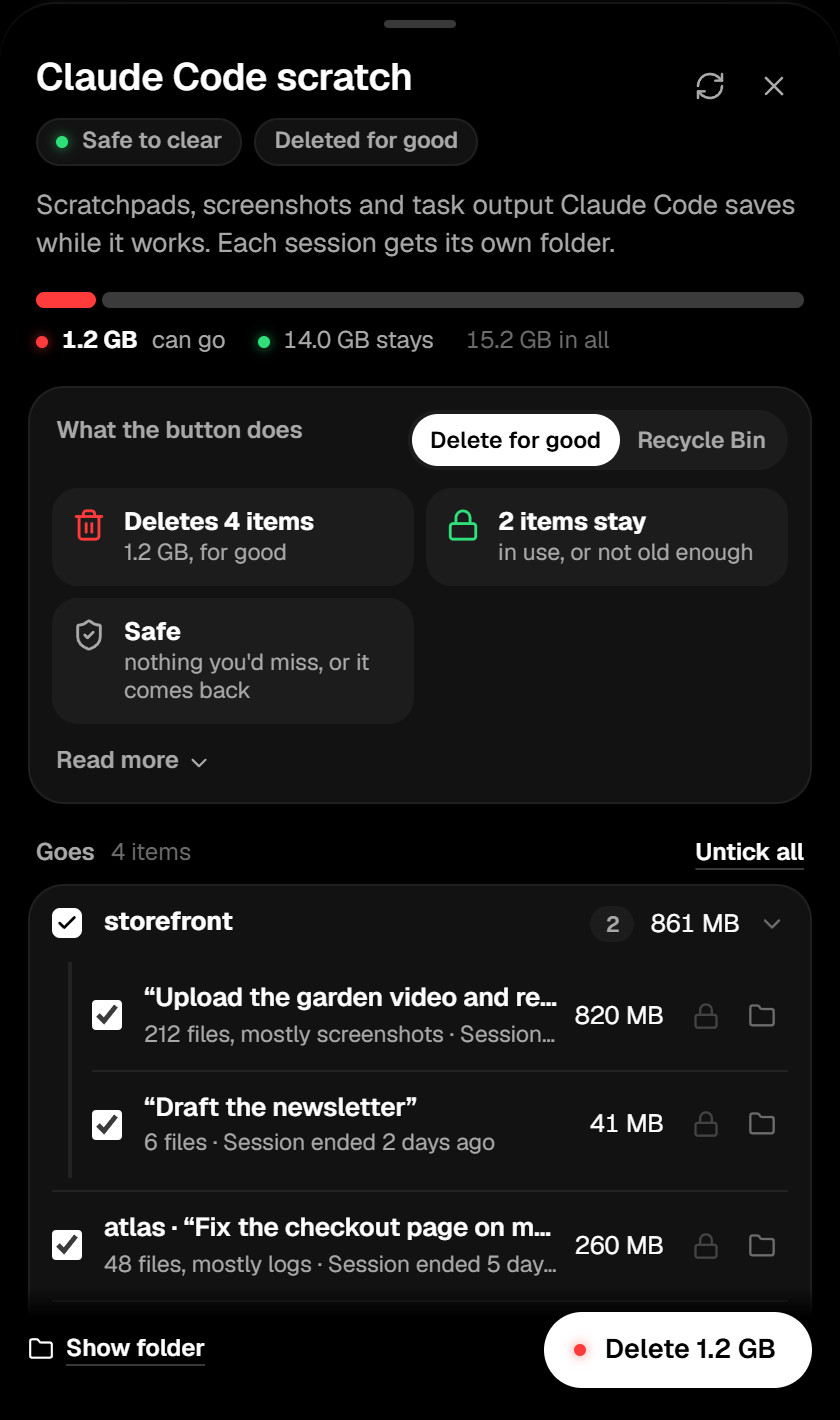
The details of a clean-up, before anything is deleted: a bar showing 1.2 GB can go and 14 GB stays, a card saying what the button does, and a tick box beside each folder that goes, with an Untick all button.
Before you press: what goes, what stays, and what the button does.

How to install

Three steps, about a minute.

  1. Download

    Download for Windows

    If you end up on GitHub's releases page, open Assets and pick the file ending in -setup.exe.

    If your browser says the file isn't commonly downloaded, that's only because it's new: choose Keep.

  2. Open it

    Double-click the file in your Downloads. momputer isn't code-signed yet, so Windows may say "Windows protected your PC". Click More info, then Run anyway.

    Then Windows asks whether it may make changes: choose Yes. momputer installs for everyone on the PC, in Program Files.

  3. Say hi to mom

    She lives in the tray, by the clock. If you don't see her, click the little ^ arrow there.

    Click her to open the widget. Right-click her for "Clean up leftovers". Closing the widget just tucks it away; she keeps watching.

    The arrows in the widget's title bar are BIG MODE.

Check the download

optional

Every release comes with SHA256SUMS.txt, a fingerprint for each file. To check yours, open PowerShell (Start, type PowerShell) and run:

Get-FileHash "$HOME\Downloads\momputer_*-setup.exe"

The Hash it prints should match the line for that file in SHA256SUMS.txt. Capital or small letters don't matter.

Updates

When a newer version is out, a red light shows on the i in the widget's title bar, with the button to get it.

Mom asks GitHub once a day. A switch in Settings turns that off.

What's next

None of it is built yet.

How each one would work

Like her?

Three ways to say thanks.

Buy mom a coffee

momputer is free for personal use and stays that way. If she helps, a tip is welcome.

5qT8edyi62wwLz9UBTiRVoN3S9UXLjbV2YVEu4GJH3zH

Questions

Something else? Ask on GitHub.

Is it free?

Yes, for personal use: at home, for hobby projects, if you're a student, at a nonprofit, and for research. If you use it for work at a company, you need a commercial license: open an issue with the Commercial license template and we'll sort it out.

The license is PolyForm Noncommercial 1.0.0.

Does it run on Mac or Linux?

No. momputer is for Windows 10 and 11. A Mac version, then Linux, is next.

Do I need an account?

No. There's nothing to sign up for and nothing to sign in to.

Why does Windows say "unknown publisher"?

The builds aren't code-signed yet, so Windows can't show who made them. Choose More info, then Run anyway.

Releases are built from the repository by GitHub Actions. To be sure your file matches the one in the release, check the download.

Does it need administrator rights?

Only to install, once. momputer installs for everyone on the PC, in Program Files, so Windows asks.

Mom herself never runs as administrator. A few clean-ups need those rights (like Windows Update's leftover downloads); when you press their button, Windows asks you first.

Does it send anything anywhere?

Nothing about you or your PC. The one thing momputer asks the internet is whether there's a newer version: one request to GitHub a day, the same from every copy. A switch in Settings turns that off. Links in the widget open in your browser.

Which agents does she know?

Claude Code, Codex, Cursor, Gemini CLI and GitHub Copilot, plus Goose, Amp and others.

Agents leave a marker on everything they launch. Mom reads those markers, and only those: never the rest of a program's environment. How she knows who started what.

Do the skills need momputer?

No. They work without it, in Claude Code or Codex. They're under the Apache License 2.0: free for any use, companies included.

How do I uninstall it?

Open Settings, then Apps, then Installed apps (on Windows 10: Apps & features). Find momputer and choose Uninstall.

If you switched on the Claude Code or Codex check-ins under House rules, switch them off first, so mom's hooks come back out of their settings. Mom's own folder, .momputer in your user folder, keeps her settings and backups; delete it if you want those gone too.

Where's the source code?

All of it is on GitHub: github.com/Thisisily/momputer. The README explains how mom works and how to build momputer yourself.